misOrz

IT Tech & Life

ASP.NET WEB API 调试


ASP.NET WEB API 中的路由调试与执行过程跟踪

路由调试

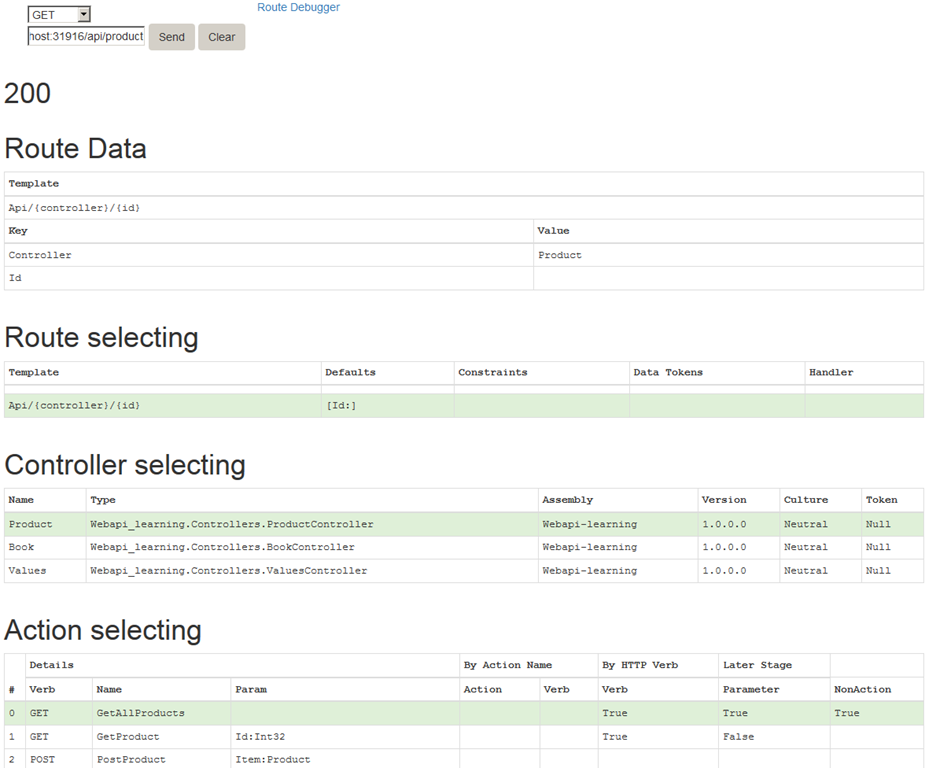
RouteDebugger 是调试 ASP.NET MVC 路由的一个好的工具,在ASP.NET WEB API中相应的有 WebApiRouteDebugger ,Nuget安装
Install-Package WebApiRouteDebugger
后访问:http://localhost:31916/rd ,出现如下错误:
[A]System.Web.WebPages.Razor.Configuration.HostSection 无法强制转换为 [B]System.Web.WebPages.Razor.Configuration.HostSection。类型 A 源自“System.Web.WebPages.Razor, Version=2.0.0.0, Culture=neutral, PublicKeyToken=31bf3856ad364e35”(在上下文“Default”中的“C:\Windows \Microsoft.Net\assembly\GAC_MSIL\System.Web.WebPages.Razor \v4.0_2.0.0.0__31bf3856ad364e35\System.Web.WebPages.Razor.dll”位置处)。类型 B 源自“System.Web.WebPages.Razor, Version=3.0.0.0, Culture=neutral, PublicKeyToken=31bf3856ad364e35”(在上下文“Default”中的“C:\Windows \Microsoft.NET\Framework\v4.0.30319\Temporary ASP.NET Files\root\821cf8a9\8af354b8\assembly\dl3\de53057b\814b6d44_0253d001 \System.Web.WebPages.Razor.dll”位置处)。
是由于现在的WebPages 与GAC中的版本冲突(MS已经把webpages 剥离了.NET Framework ),只需要在webconfig中指定使用的版本即可
<dependentAssembly>
        <assemblyIdentity name="System.Web.WebPages.Razor" publicKeyToken="31bf3856ad364e35" />
        <bindingRedirect oldVersion="1.0.0.0-3.0.0.0" newVersion="3.0.0.0"/>
      </dependentAssembly>

现调试路由就方便多了
image

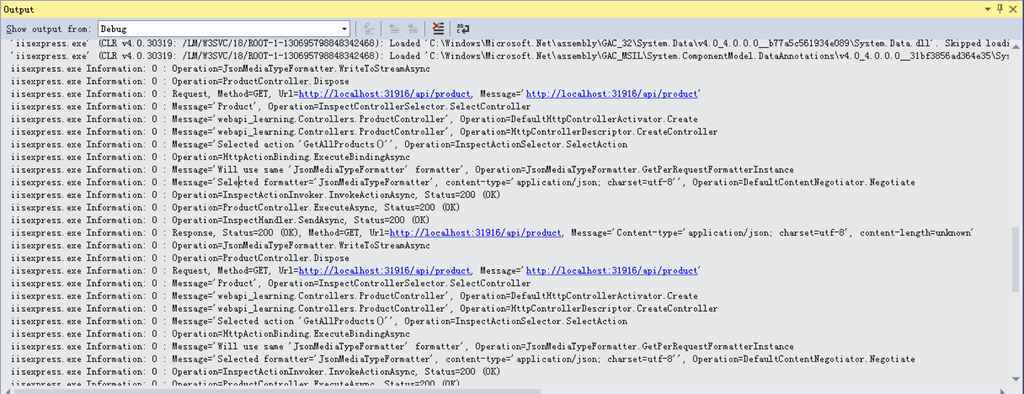
执行过程跟踪

Install-Package Microsoft.AspNet.WebApi.Tracing Update-Package Microsoft.AspNet.WebApi.WebHost
启用代码
复制代码
复制代码
public static class WebApiConfig
    {
        public static void Register(HttpConfiguration config)
        {
            // New code
            config.EnableSystemDiagnosticsTracing();
            // Other configuration code not shown.
        }
    }
复制代码
复制代码
image

RestSharp installation in Visual Studio 2015


Reference : https://stackoverflow.com/questions/47651525/issue-with-restsharp-installation-in-visual-studio-2013


If anyone encounters this kind of problem in the future. I solved it by installing it via Package Manager Console found in (Tools -> NuGet Package Manager -> Package Manager Console) and running the following command:

  Install-Package RestSharp -Version 103.1.0
Notice that the installation for RestSharp version 106.1.0 always kept failing, so I changed the version to 103.1.0. Hope this helps anyone with a similar issue.

EDIT

Thanks to phuzi in the comments, RestSharp version 106.1.0 requires .Net framework 4.5.2, as for version 103.1.0 no dependencies are listed.

.net使用UpdatePanel時FileUpload控制項失效

Reference : http://www.cnblogs.com/caicainiao/archive/2010/12/08/1900377.html

1.使用UpdatePanel後,FileUpload的HasFile始終為false,無論你是否選中了上傳文檔!

2.使用UpdatePanel後,在後台進程中,你在使用Response.Write(“”)看看,不給你JS錯才怪,而且打印不出你要的東西!

方案一:設置ScriptManager 的EnablePartialRendering=“false” 即可! 缺點:同一個頁面上的多個UpdatePanel不可以獨自刷新了.另外,當你的UpdatePanel中存在Validator (驗證控件)的話,會造成整個頁面postback


<asp:ScriptManager ID="ScriptManager1" runat="server" EnablePartialRendering="false">
    </asp:ScriptManager>
    <asp:UpdatePanel ID="UpdatePanel1" runat="server">
    <ContentTemplate>
        <asp:FileUpload ID="fu" runat="server" />
     </ContentTemplate>
    </asp:UpdatePanel>
方案二: 來源於:http://marss.co.ua/FileUploadAndUpdatePanel.aspx

還記得UpdatePanel 裏面的Triggers?如果忘記了真的該好好複習了! PostBackTrigger 指明PostBack提交的按鈕ID,還有一個<asp:AsyncPostBackTrigger/>這個當然是異步了哦!PostBackTrigger 他只回發該UpdatePanel 裏面的東西,不會影響其他UpdatePanel 的回發

使用 PostBackTrigger 控件可使 UpdatePanel 內部的控件導致回發,而不是執行異步回發。

UpdatePanel中使用FileUpload具體見:http://msdn.microsoft.com/zh-cn/library/system.web.ui.postbacktrigger.aspx

<form id="form1" runat="server">
    <asp:ScriptManager ID="ScriptManager1" runat="server">
    </asp:ScriptManager>
    <asp:UpdatePanel runat="server" ID="up1">
    <ContentTemplate>
        <asp:FileUpload ID="fu" runat="server" />
        <asp:Button ID="BtnUpload" runat="server" Text="Upload" onclick="Btn_Click" />
     </ContentTemplate>
     <Triggers>
        <asp:PostBackTrigger ControlID="BtnUpload" />
     </Triggers>
    </asp:UpdatePanel>
    </form>